Server Usage
Basic Usage Linux
Every user will assign a folder under \home folder, and you only have permission to your own folder. The folder name is as follows:
/mnt/zoeliserv/1/home/[user name]
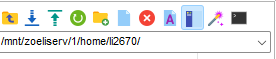
Most of operations of Linux will be done in Terminal, and you can use process you file (upload, download, edit, delete) by any SFTP software with interface.
You can always use tab to autocomplete the command, filename, and potential options.
cd is one of most important command in Linux to change the current path of terminal. And any commands operations will set to the current path in default. Here are example for use cd command:
cd /home   # Change the path to /home folder
cd /mnt/zoeliserv/1/home/li2670    # Change the path to /home folder with absolute path
cd ..   # Change the path to parent folder
ls command will list all content under the directory.
clear command will clear the message of terminal.
You can find more information about Linux command via this link.
Warning
Most of Linux command will not return any error messages if execute successfully and most of them will not give warning if you command may caused issue. Be caution with all command that you type!
Common Linux Commands
Here are commands to start common software on server.
R command will start the R environment.
python or python3 command will start the python environment.
matlab command will start the Matlab.
jupyter command will start the jupyter notebook.
Development Environments Set-up
Conda
Part I: Initial Conda Environment
Step A: Initialize conda for your user:
conda init
Step B:Make the conda environment immediately available for your current shell session
source ~/.bashrc
Step C: Deactivate the base conda environment
conda deactivate
Part II: Usage of Conda Environment
Step 1: Create a New Conda Environment (You can use any version of python instead of 3.10)
conda create -n my_env python=3.10
Confirm with y when prompted.
Step 2: Activate the New Environment
conda activate my_env
Step 4: Install Software
pip install …
Step 7: Deactivate the Environment
When you’re finished, deactivate the Conda environment to return to your base environment.
conda deactivate
Port-Forwarding
There are softwares need port-forwarding for use such as jupyter notebook, or other web-based applications. You need to get the port software need, then do the port-forwarding.
Click the Tunneling Tab.
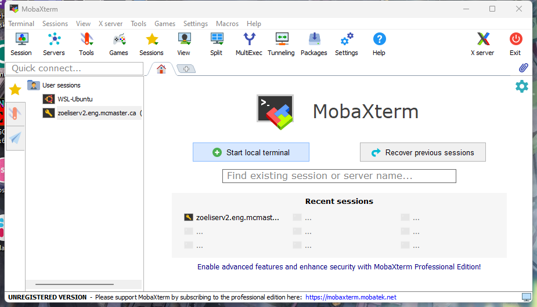
Then click New SSH Tunnel
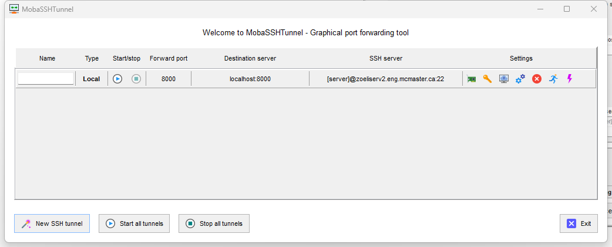
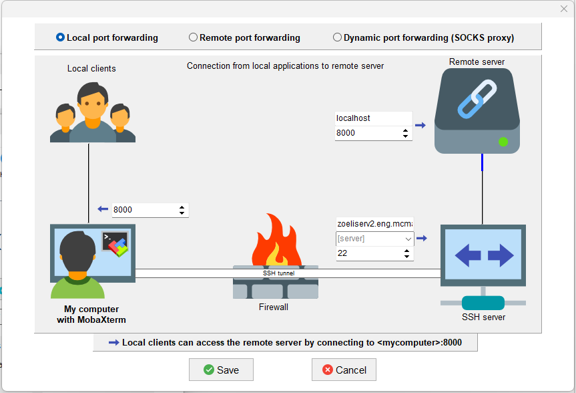
Input the server information, forwarding port on both server and your device. The following example showing forward server port 8000 to my device port 8000.
Then click Start icon.
Then go to your browser and input following:
127.0.0.1:[port]